

TM 55-2815-574-24
0140
INSTALLATION - Continued
WARNING
Sealing compound may cause irritation to the eyes or skin. Use in well-ventilated area.
Wear protective goggles and clothing. In case sealing compound comes in contact with:
Eyes, flush immediately with water.
Skin, wash with soap and water.
Failure to comply may result in personnel injury.
2.
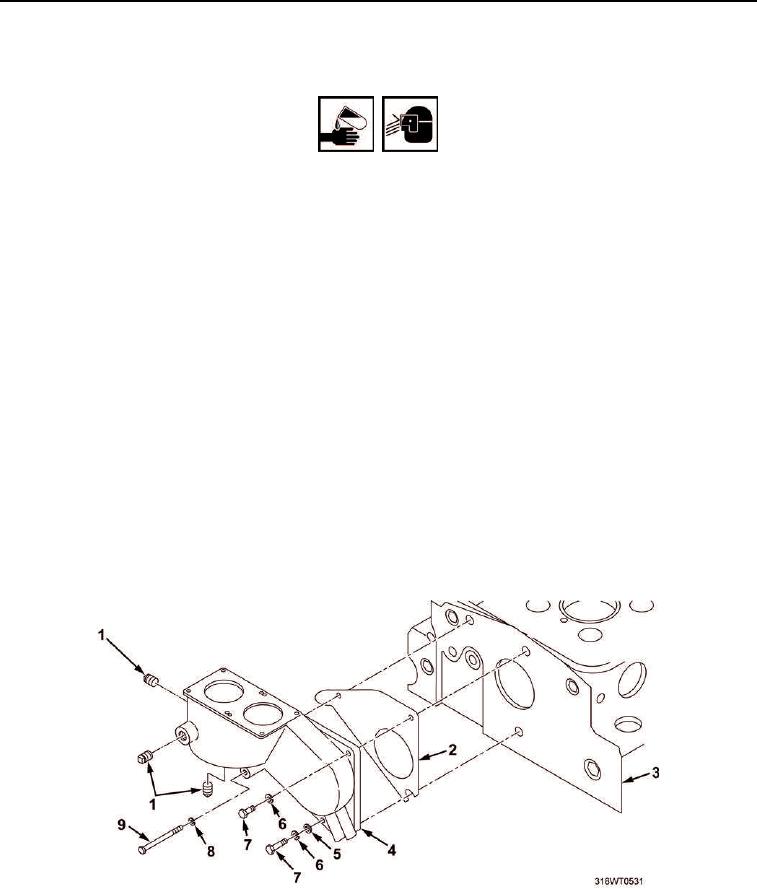
Apply sealing compound to gasket surface of cylinder head (Figure 1, Item 3).
3.
Apply sealing compound to gasket surface of new thermostat housing (Figure 1, Item 4).
4.
Install new gasket (Figure 1, Item 2) on cylinder head (Figure 1, Item 3).
5.
Position new thermostat housing (Figure 1, Item 4) on cylinder head (Figure 1, Item 3).
6.
Install capscrew (Figure 1, Item 9) and lockwasher (Figure 1, Item 8) securing thermostat housing
(Figure 1, Item 4) to cylinder head (Figure 1, Item 3).
7.
Install two capscrews (Figure 1, Item 7), lockwashers (Figure 1, Item 6) and one flat washer
(Figure 1, Item 5) on thermostat housing (Figure 1, Item 4).
8.
Tighten capscrews (Figure 1, Items 7 and 9).
9.
Apply antiseizing tape to pipe plugs (Figure 1, Item 1).
10.
Install pipe plugs (Figure 1, Item 1) in thermostat housing (Figure 1, Item 4).
11.
Tighten pipe plugs (Figure 1, Item 1).
Figure 1. Thermostat Housing.
END OF TASK